Building a DIY pedal kit? Here are some tips for neatness and reliability
The idea of making your own effects pedals is as enticing as it is intimidating. The world of DIY pedals is in a fantastic place right now – there’s not really been a better time to start making your own effects, with a huge selection of kits out there to try your hand at, and plenty of resources for designing your own circuit. But before you hastily reach for a soldering iron and doom your first attempt to the “to-fix” pile, I’d like to share some tips for making DIY pedals both work and look great, on the first try.
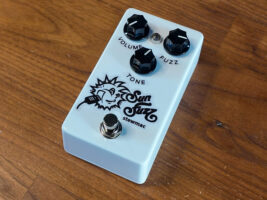
First things first – the kit itself. Today I’m assembling a StewMac Sun Face kit – a Fuzz Face-derived circuit with an added tone control. Pedals based around the Fuzz Face circuit are fantastic for a beginner, as they have a pretty low parts count – but the reward is oodles of fuzzy fun.
I’d also recommend using a kit with a PCB for your first pedal. I started out on stripboard, also known as veroboard. And while buying a bunch of stripboard can afford you some flexibility down the line, it’s also very fiddly to work with and pretty unforgiving if your soldering isn’t pin-neat to start with. How do I know this? Well, the less said about the total car-crash that was my first attempt at a veroboard Meathead fuzz, the better…
What you’ll need
Alongside the kit itself, you’ll need a few other things. First and foremost – a soldering iron (ideally one with a relatively small tip and temperature control), and some solder. You’ll also need some needle-nose pliers (seriously – don’t try and do this with the big chunky kind), a screwdriver with both a philips head for the enclosure screws and a small flathead for the knobs, some flush cutters for component legs, and some wire cutters/strippers. And finally – a multimeter. This is more essential than you’d think – it will save you a lot of time when troubleshooting, and in component identification.
And, while it’s not totally essential, some way of holding the board off your work surface is a game-changer. I like a set of helping hands (just insulated crocodile clips) on a stand, as these can also be good for wire tinning and splicing, and a few other things. You can get something like StewMac’s PCB holder, too, which lets you spin the board around when you’re ready to solder the other side. Whee!
What’s included
Being a kit rather than just a PCB, the StewMac Sun Fuzz comes with a pre-drilled and pre-painted enclosure (doing this yourself is a guide for another day), as well as some wire and the needed off-board components (a power jack, two audio jacks, and a footswitch), potentiometers for the pedal’s controls, and, of course, the board itself – plus all needed resistors, capacitors, transistors and diodes.
Get on board
The Sun Fuzz comes with a handy set of instructions which will tell you where things go – the PCB also has the required component values printed straight on it. First off – resistors. These are components that restrict current flow, and their resistance is measured in ohms, or Ω. You’ll also see KΩ and MΩ, or just K and M, standing for kiloohms (thousands) and megaohms (millions). So, for example, the spot for a resistor on the Sun Fuzz PCB labeled “100k” wants a 100 kiloohm, or 100,000 ohm, resistor. For values below 1,000 ohms you might occasionally see “R” used to make it clear that there’s no missing modifier – if a kit or a schematic indicates a “100R” resistor, it just means 100 ohms.
Resistors show their values via a system of coloured stripes, and the Sun Fuzz instructions include a lookup table to read this value. But this is my guide, and I’m colourblind as hell – and even if you do have full colour vision, it’s easy to be sure by reading the resistors’ value with a multimeter. I do this by holding the component with my thumb so that each leg touches one lead of the meter, and then cycle through the meter’s setting until I get a consistent reading. Multimeters need to be set to an order of magnitude (this lets them read a wide range of values accurately), and so if you try and read a 1M resistor on the 20k setting, you’ll get an error. If the meter reads as very close to zero, try bumping the setting down to a smaller order of magnitude.
Once I’ve figured out the resistor’s value, I bend the component legs to a sharp 90 degrees (as close to the body of the resistor as possible) and pop it in its respective slot, using my helping hands to elevate the PCB so I can get each one nice and flush to the board.
If you’ve looked at the Sun Fuzz’s manual, you might have noticed it doesn’t start with the resistors. So why am I doing so? Well, they’re the smallest components on this board, which brings us to my first trick for a neater look. Once you’ve got all of your resistors in place, find something flat (the back panel of the enclosure is handy for this), and hold it against the board so that it’s keeping the resistors in place. Then, release it from the helping hands or PCB holder and turn the whole thing over. You should now be looking at a forest of unsoldered and untrimmed component legs.
Resistors that are yet to be soldered. Please ignore how messed up the insulation is on that helping hand – it’s been through a lot…
On to soldering. I’m using the Pinecil, an affordable little iron that’s great for jobs like this. Once it’s good and hot (I set it at around 375 degrees C, which I’ve found works great with the particular solder I use), I hold it against the component leg and the PCB pad for a moment, and then go in with my solder – not too much, just enough that it floods into the pad and wicks up the component leg to make something roughly the shape of a Hershey’s Kiss. Then after a second or so I remove the iron and let it cool. You may be tempted to blow on it – do not do this. The ambient air temperature will cool it down fast enough, and, yes, there is the risk of blowing molten metal off the board and onto your laptop/notebook/cat. Ideally we avoid this situation.
Good soldering skills come with practice – this is one of the reasons a low-stakes kit is good – and if you’ve never done it before, you will doubtless mess up a few times. And sometimes, bad solder joints are hard to spot – just look out for cold joints, where the solder is in a little ball that’s lifted from the pad, and try to avoid making too big a ball. Where PCB pads are close, check you haven’t bridged any gaps with solder. The main tip here – ha – is patience.
I go in from the legs that are near the sides (allowing the most clearance for the iron), and once I need a little more room, I trim the soldered component legs with my flush-cutters. Keep an eye on the component legs – wear eye protection if you’re worried about them flying into you, and/or hold onto the legs themselves as you trim to keep them in check. They’re technically waste, but keep a hold of two of them – we’ll need them for later.
As we’ve started with just the resistors, which are all the same size, they’ll all be held against the board, and so once they’re soldered and trimmed, and we flip back over, it’ll look nice and neat. For more complex builds with more components, you can then work up the sizes – do diodes next, then box capacitors and so on. For larger components there’s another trick that we’ll get to in a second.
So, onto capacitors, the components that store charge. In guitar pedals they are most often used for filtering certain frequencies and blocking direct current. The non-polarised variety don’t care which way they go into the PCB, and will often be little droplet-shaped things or boxes – here we’ve got a single box capacitor, so we don’t need to distinguish its value. If you do, capacitors often just have their values written on them (or a value written in a simple numerical code).
Their value is technically measured in farads, but unless you’re plotting a very elaborate murder, you won’t see anything close to a 1 farad capacitor in a guitar pedal. Pedals instead stick to picofarads (pF or p, e.g. 100pF or 100p), nanofarads (nF or n) and microfarads (μF, or μ, occasionally written as uF or u).
So, having identified the box capacitor, I whack it into its slot – but how to keep it neat? Well, here’s where our good friend masking tape comes into play. Grab a small strip and tape the capacitor down. The tape will keep it nice and flush to the board as you follow the same procedure as you did with the resistors – flip, solder, trim.
Our old friend masking tape is being used here to keep some trimpots flush to the board, before I flip and solder.
The rest of the board population goes much the same way. The electrolytic capacitors are the cylindrical ones – they’re polarized, and therefore do care about which direction they go in. They’re luckily pretty foolproof in a lot of ways, as they have their values written right on them, and a set of minus symbols indicating their negative side. The negative lead – the shorter one – goes in the round hole – their positive side goes in the square hole.
The transistors are those little three-legged things that look they came from Mars equipped with heat-rays (they didn’t, though – the chances of anything coming from Mars are a million to one). They have a collector, base and emitter. The BC108s in the Sun Fuzz have a little tab on the case indicating the emitter, and so it’s easy to match that to the diagram on the PCB.
There’s also a diode for reverse-polarity protection. It has a stripe to match the negative side, which can also be matched against a diagram on the PCB. For the diodes and the transistors, heat can damage them a little easier, so be sure not to hold your iron to their legs for too long. To be extra safe, you can clip a crocodile clip onto the legs as you solder them – this acts as a heatsink, so you don’t dump all of the heat of your soldering iron into the sensitive parts of the actual component.
Finally for the on-board stuff, there are some trim-pots. These are smaller versions of potentiometers, the same components that make up the pedal’s actual knobs. There are two here, of different values – 50k and 5k. But, you’ll notice on the trimpots themselves, the values are 503 and 502. What’s going on here? Well. for codes like these, that last number can be substituted with that many zeroes to find the value in ohms. So for 503, that’s a 50 with three more zeroes – 50,000, or 50k. For 502 it’s 50 with two more zeroes – 5,000, or 5k. Easy!
For these and the other larger components I do the same masking-tape trick to keep things neat – again, you can bend out component legs to keep things in the board, but I like to avoid doing that, as when you flip over, this can lead to things moving about a little bit, giving more of a chaotic and cluttered look to the pedal you’ve spent so much time on. Obviously, a messy circuit that works still works, but it’s nice to be proud of what you’ve made.
Gaining control
For the potentiometers, I defer to the technique described in StewMac’s manual. Sometimes when building a pedal you’ll need to run three wires off to the pot – here, the pots are just right-angle PCB mount ones. If your pedal is symmetrical like this one is, you can put the pots in the top of the enclosure (facing upwards), and then pop the PCB on top, with some insulating tape on the back of any pots that might hit the back of the board. This means that when we solder the pots in place, they’re guaranteed to fit the enclosure we’re using. If the enclosure is asymmetrical, you can do the same thing, just with a few extra steps – you’ll just have to actually screw the pots into their final places, and solder the board inside the enclosure (taking care not to melt any components!) – then, unscrew the pots to continue to work on the board.
Placing the PCB like this can make soldering the pots a lot easier.
Off the board
The next step is to prep your populated board for its new home. The Sun Fuzz has, handily, multiple attachment points for ground, and a power input that’s right where the socket will be – we want to solder some shortish (7cm or so) lengths of wire into these. Right now I’m just focusing on the wires at the top of the PCB – here’s another point where I diverge from the instructions. We’ll come back to the wires for the footswitch.
For each hole, cut the wire to length, and strip a small (1-2mm) length of insulation off both ends. Then – importantly – tin the loose ends of wire. My personal technique is this: first, I give the ends a little twizzle with my thumb and forefinger to consolidate the loose strands. I then place the length of wire in a helping hand, or, if I’m feeling lazy, the upturned empty screw hole of a pedal enclosure. After this I heat the exposed part of wire with my soldering iron (taking care not to melt the insulation), and touch some solder to it – if the wire is hot enough, the solder will wick into the strands.
This may seem excessive when you’re starting out, and yes, it’s a pain, but it’s worth doing – when you thread the wires through PCB pads or the power/audio jacks, it keeps the strands from fraying outwards. This fraying not only looks a bit rough, it can (more crucially) lead the wire to break, or short out against something it shouldn’t.
Once tinned, you can pop the wires into their respective holes (ignoring the LED for now) and solder. What side you solder doesn’t really matter, in my opinion, as long as you have enough length to reach what you need to reach.
How to wire a true-bypass footswitch
Onto the footswich wiring. Now – here I’m going to go rogue again, and ignore the little daughterboard. If you are using it, it’s pretty self-explanatory (wire each thing on the daughterboard to the thing on the PCB) but I want to demonstrate how to wire a footswitch without one. It’s a handy skill to have, especially if you end up repairing any hand-wired pedals that need a new footswitch. Looking down at the footswitch, with the lugs oriented sideways, here’s what’s going on:
A standard footswitch we use for true bypass is a latching 3PDT, or triple-pole double-throw, footswich. What do all of those words mean? Well, latching means what you hopefully think it does – press it once, the switch goes one way. Press it again, it goes the other way. The other mode of operation would be momentary – IE, only switching when your foot is actually on it. Triple-pole means that there are three columns of connectors, and double throw means that each column of connectors has three connectors in it – one central row, and then two rows that are ‘thrown’ to, as you can see above.
There are a few ways to wire a footswitch, but below is my preferred method. Let’s go through how it works, starting with your plain old input signal, which we connect to the central lug on the leftmost column. The input jack is on the right of the pedal, but we’re looking down on an upside down pedal as we wire it, so we’re working left-to-right for now. When the pedal is in bypass, the central row is connected to the bottom row – so, this connects the input signal straight to that little jumper wire that goes past the middle column, and to the lug on the bottom-right of the switch. As the bottom row lugs are connected to their respective middle-row lugs, this will be sending our input signal straight to the rightmost middle lug. Connect this lug straight to the output jack, and hey presto, we have true bypass! We’ve effectively wired the input and the output of the pedal straight to each other using the switch.
When the footswitch is pressed, the middle row is connected in the other direction – to the top row. So, let’s follow the input again. It comes into the middle row and the switch sends it upwards, so we can feed that to the input of the pedal’s actual circuitry. The output of the circuit can then be connected to the top lug on the rightmost side of the switch, which will send the output of the pedal straight to the output jack. Which is, presumably, what you want when you press the footswitch.
So, let’s look at that middle column – and that jumper from pin 1 to pin 6. The central lug is connected to ground, the zero-point for voltage and return point for current in the circuit. The top lug of the middle column is connected to the negative side of the indicator LED. We then connect the positive side of the LED to the 9 volt power supply – with a 2.2k resistor somewhere along the way to limit the current and keep our LED from immediately burning out. This means that when the pedal is on, current has a path to ground through the LED, and hence – light. When the pedal is bypassed, the ground lug is connected in the other direction – current can’t flow through the LED, as the lug it’s connected to is no longer connected to anything.
This is where that jumper comes in. All it does is connect the input of the pedal to ground when it’s bypassed, using the same ground connection as the LED. This isn’t needed for every pedal, but for higher-gain circuits, this just makes sure the input of the pedal isn’t going to oscillate or pick up noise, as this can make its way into the output of the signal, even in bypass. This is due to a fun quirk of physics that means electrical signals are only kinda contained by wires.
Having a good understanding of the signal flow of your switch is very handy – particularly if anything goes wrong with it. Being able to look at a footswitch at a glance and go, “oh, I’ve wired this wrong” could save you hours of troubleshooting the board itself.
Putting the footswitch theory to the test
We can solder the footswitch a little like how we soldered the pots – place the pots through the top of the enclosure again, and then put the switch in its hole upside down. If you’re not using a daughterboard, use your pliers to bend a component leg into the required shape for the bypass jumper, and also feed another leg through pin 1 to pin 6. To get the bypass jumper to stay put, you can feed it through the middle row as well to hold it in place, solder the bottom row, and trim the excess. Once the jumper from pin 1 to 6 is fed through, you can solder its pin 6 connection, but leave the pin 1 connection to be soldered at the same time as the circuit input wire.
It won’t win any awards for looking overly snazzy, but it’s no rat’s nest either.
Speaking of wire – you can then measure out enough wire for each connection (note – some kits label the negative side of the LED simply as “Sw” or “Switch”, so that’s what needs to be wired to pin 4), cut, strip, tin and solder. You can use your needle-nose pliers to make sure you thread wires neatly into their respective footswitch holes. Here you can also solder in wires for the input and output – they’ll need to reach the top of the pedal’s enclosure, plus have a little bit of slack. Thinking about how long each wire needs to be, and then giving it just a little bit more so it’s not taking any strain, is how you avoid the insides of your pedals looking like the bit at the end of Tetsuo: The Iron Man.
Approaching the end
So, we’re nearly there – we’ve got a populated pcb and a hopefully working footswitch. Into its new home it goes – for the LED, there are different approaches that kits take, but here, the best thing to do is attach the bezel to the case, and then insert the LED (in its little jacket) so that it’s oriented correctly – long leg towards the round pad. Then, drop the PCB into its new home and finger-tighten the nuts and washers for the footswitch and the potentiometers. As it goes in, you can tilt it to “catch” the LED leads so they go up through their pads, or you can then use needle-nose pliers to fold them over and then solder them in place.
We also don’t need to add a current-limiting resistor (sometimes abbreviated to CLR) here, as we already have – it’s part of the actual circuit design. Keep in mind, though, if you are wiring your own LED up off-board, you’ll need to put one somewhere in between the switch, LED and power.
So, time for the power and audio jacks. The power jack here is unswitched, and so simply takes the nine-volt power straight from the supply and passes it to two lugs – the short lug for the centre of the barrel jack – used for ground/negative, in the case of 99.99% of pedal power supplies – and the long lug for the positive. Two of the wires from the top of the PCB are labelled + and -, so these need to go to the long and short legs of this power jack. Take care when soldering these to the lugs – it’s easy to accidentally push the iron into the plastic body of the power jack and melt it.
Each audio jack has two connections – sleeve and tip. The tip is for signal, and the sleeve for ground. Here, we’ve got mono open-style jacks, which are nice and simple – a connector each for tip and sleeve. Which one’s which can be seen visually, but if you’re unsure and/or you’ve got a different style of jack, you can check with the continuity mode on your multimeter.
The sleeve of each jack can be wired to the ground connections on the PCB we soldered earlier. Soldering the wires through the tabs here can be a little tricky – take it slow, and remember you can always loosen the jack to get it to a more convenient orientation for soldering. The tip connectors can then be soldered to the respective input/output wires we soldered to the footswitch earlier.
It’s good practice to run the input and output wires close to the walls of the enclosure, along opposite sides – this is another thing that helps reduce noise and oscillations. We’ve soldered the circuit’s ground connections to the sleeve of the audio jacks – and as they’re metal jacks, these are in contact with the enclosure, connecting it to ground as well. Like the shielding in your guitar, this helps reject any electromagnetic interference (EMI) that might come in from the outside. Keeping the inputs and outputs close to the enclosure also helps stop them acting as antennae, and running them on opposite sides helps prevent feedback – don’t be tempted to twist the in and out wires together and run them as a single unit from the jacks to the footswitch. This will just mean you’ll get a load of squealing oscillation, particularly with a high-gain circuit like a fuzz.
So, that should be everything wired up – take some time to do a visual inspection before you tighten all of the jacks. Are any exposed wires touching? Are there any spots on the PCB missing any components? Do the audio jacks let you plug patch cables in without the plugs hitting any wires? Is the power definitely wired the right way around?
Once everything’s tightened up, you might want to do a quick test before you close the enclosure. Just remember two things – firstly, if the pedal is still open and upside down, the input is on the other side than it normally is. I cannot tell you how many times I thought a pedal was dead after I finished building it, only because I tested it with the cables plugged in the wrong way. Also remember – you’ve soldered in a volume control, and it may be set to zero. Check it’s turned up before panicking!
The stickers go on! The disparate ways of applying artwork to pedal enclosures could fill a book – but stickers are nice and simple.
So, hopefully you get a nice fuzzy sound when you press the footswitch, and the LED lights up, and the controls all do what you want. Brilliant! One last thing for the Sun Fuzz – setting the trimpots, which I do a quickly by ear and then close everything up. Screw on the knobs with a small flathead screwdriver, apply the stickers, and, well, you’re finished. You have a fuzz pedal – one you made yourself, that, if you take the right care during assembly, should last a lifetime.
The post Building a DIY pedal kit? Here are some tips for neatness and reliability appeared first on Guitar.com | All Things Guitar.
Source: www.guitar-bass.net