Blackstar Beam Mini review: “a new benchmark for practice amps”
$229/£169, blackstar.com
I remember the first time I played a Blackstar Fly 3. It would have been around 2014, not long after the British amp maker launched their revolutionary mini-sized practice amp, and within about 30 seconds of plugging one in, you knew that Blackstar had done something remarkable.
READ MORE: Teaching Machines FuzzBillion review: is this the most ambitious and unique dirt pedal ever made?
Because this was a mini-amp that – through clever physical and digital engineering – sounded remarkably big. Credibly big. So big that for bedroom players, you could make the argument that this teeny marvel was all the amp you needed to practice at home, and sound good doing it.
I lost count of the number of times I recommended friends buy a Fly over the following few years, and not one of them was disappointed. Then, about five years ago, the Fly started to feel like it was being left behind. The arrival of Positive Grid’s game-changing Spark family of amps kicked off an arms race to see how much tech and functionality could be squeezed into a practice amp – the smart amp sector was born.
And while the Fly 3 remained a quality option, and other arrivals like the ID:Core Beam and Beam Solo showed that Blackstar was moving forward, you did get the sense that the brand was playing catch-up.
That is, until now. Because Blackstar has just dropped the Beam Mini, and while it might look like a spiritual successor to the Fly 3, under the hood it might very well represent the next great evolutionary leap for smart amps.
Image: Press
Blackstar Beam Mini – what is it?
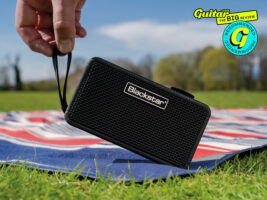
Let’s get the spec stuff out of the way up top. The Beam Mini is a 2x 12-watt stereo practice amplifier with a pair of full-range two-inch custom drivers alongside two passive bass radiators, all somehow squeezed into an acoustically-tuned cabinet that’s roughly the same size as a can of Coke.
Inside, you’ll find a modelling amp that offers component-level modelled sounds for 12 onboard guitar amps (six Blackstar, five generic), a trio of bass amps and an acoustic amp. You also get Blackstar’s impressive CabRig speaker and mic emulation for all these amps, plus 35 effects divided into six blocks (three pre-fx, three post-fx). It’s all powered by the same Beam app that was used for the Beam Solo, and as you’d expect for a modern practice amp, you can also stream music wirelessly, and there’s also a USB-C out and 3.5mm headphone jack for silent practice and for plugging in a headset mic, so you can sing and play at the same time.
So far, so ‘smart amp in 2026’ right? Well, this is where things get really interesting. The Beam Mini is the first amp that supports Neural Amp Modelling from Tone 3000. For those not in the know, NAM is effectively an open-source, free-to-use amp profiling technology allowing you to create remarkably accurate digital captures of real amps in the same way that Kemper, Neural DSP, Line 6 and others do.
Various digital and pedal-based products have started to incorporate NAM in recent years, but it’s never before been seen on an actual amplifier. So when I say that it has 12 onboard guitar amps up top, well, in reality it’s more than that – a LOT more.
The demo version that I’m using to test the hardware has over 100 real-world full-rig amp captures available, but the Tone 3000 website features over 2,000 – with more being added all the time.
Another eyebrow-raising feature is one that is not quite there yet, but it’s exciting. The Beam Mini also plans to integrate with Moises – the AI-powered stem separation app, which allows you to adjust the levels of instruments and vocals in any piece of recorded music. This means you can strip the guitar track out of your favourite songs to play along to. It’s a very cool idea, and the potential benefits of that for a practice amp are pretty obvious, but Blackstar hasn’t managed to get it fully integrated for launch. I’ve got a demo version to try out, but Blackstar’s head of products Alex Gee says the finished version will be available hopefully by the end of the summer.
Image: Press
Blackstar Beam Mini – build quality
Taking the Beam Mini out of its box, there’s a reassuring heft to the thing. It’s not heavy to the point where you’d think twice before chucking it in a backpack, tipping the scales at 733g/1.6lbs, but it doesn’t feel flimsy or insubstantial, which is always a good thing when you’re going to plug a cable into it.
The Mini is covered in a rubber outer shell with a classic tolex pattern on it. It’s very similar to the covering on the Positive Grid Spark GO, or (and the ex-Bletchley people at Blackstar probably won’t appreciate me saying this) Marshall’s current generation of portable Bluetooth speakers. As a device that’s designed to do both, though, that’s no bad thing. The Mini is also IP66-rated for dust and water resistance – that means you won’t have a good time if you drop it in a pool or in the sea, but it’s not gonna freak out if you drop it in the sand or it gets splashed.
The top of the unit contains the XpressFX control panel – this is effectively a large knob combined with a white LED bar, and a selection of buttons to select the various parameters – patch, gain, EQ, FX and volume. You can load up to five preset amp and effects chains onto the Mini’s hardware, and you swap between them by hitting the patch button and then selecting your patch, which is reflected by the position of the LEDs on the bar.
Candidly, I do not love this. It works well enough, but the whole XpressFX thing feels a bit form over function. I found it wasn’t always immediately clear which of the five LED segments you’re actually on, making it a bit of a crap-shoot when it came to switching patches, that’s if I even managed to switch the patch at all. Because the same knob controls adjusting everything, on multiple occasions I found myself switching the patch or dialling down the gain when I wanted to adjust the volume, for example.
It looks very pretty, no arguments there, but I wish they’d just stuck a bunch of old-school knobs on there instead – it would certainly have made the whole thing more intuitive. One thing I do like is that if you hold down the volume button, the onboard tuner activates – meaning you don’t have to delve into the app menu to find it.
If the control panel seems like it’s lacking a bit of common sense, the same can’t be said for the placement of the jack plug. The absolute bane of any small amp is how easy it tends to be to tip them over with an indelicate tug on the cable. Because the jacks are generally on the top, it’s basically an invitation for them to tip over and take a tumble onto the floor.
It’s amazing that nobody thought of this sooner, because the Beam Mini’s solution is elegant and brilliant. The jack plug is relocated to the bottom edge of the amp, on the right-hand side. Combined with that rubbery, grippy coating, it meant that throughout my review period I never once sent the amp crashing to the floor.
Image: Press
Blackstar Beam Mini – usability
A smart amp lives and dies on the strength of its app, and mercifully, the Beam’s is a good one. It connects to the Beam Mini from my iPhone in a matter of seconds, and presents a simple and straightforward GUI – the tabs are laid out straightforwardly with separate tabs for pre-fx, amp, post-fx, CabRig and a music tab.
The latter features a bunch of backing tracks and lessons curated by Blackstar, and using the search function you can also use YouTube to find songs, backing tracks and the like to play over. Disappointingly, unlike the Spark app, you can’t natively integrate Apple Music or Spotify into the app itself, but provided you’ve connected your phone via Bluetooth audio, you can simply stream it from its respective app and it’ll come through the Beam regardless.
The app also features the ability to record natively (though you’ll need to connect your phone via USB-C manually to the unit) as well as a community hub where you can search through a load of user-generated presets. Perhaps unsurprisingly, the tones on offer here don’t have the depth and breadth that Positive Grid’s Spark does (they’ve got half a decade’s head start after all), and most of them at launch appear to be from Blackstar artists and ones from various influencers that the brand has collaborated with on the launch. The potential is here, though, for it to become a truly useful database.
And of course, the onboard sounds are just part of the magic here – the NAM captures open up a huge other realm of sonic possibility, and accessing them is a doddle. To audition a capture, you simply select the amp tab and scroll down in the list to the Tone 3000 tab at the bottom, where you’re redirected to a page that offers a list of all the available amps. The Beam Mini is limited to downloading just ‘complete rigs’, so that’s all you can see here, and for the pre-release version I was testing I had about 50 to choose from – the full library is available for final users.
Once you’ve chosen a rig, simply tap the download button and you can audition it live on the Beam Mini (as you can with any tweaks to the signal chain on the app). One thing to note is that when you load a NAM capture, the CabRig tab disappears as the capture includes its own cab simulation, and you’ll also notice that the pre-fx tab (which contains drive pedals, boosts etc) is slimmed down to just a noise gate.
This is a little disappointing, for sure – who doesn’t want to have a dirt pedal in front of their amp? But Gee explains that it’s simply a matter of processing power. In order to be able to accurately render the Tone 3000 captures, sacrifices had to be made, and given that most captures offer clean and various levels of dirty options, the team felt that retaining the likes of delay, reverb and modulation post-fx was more important. Gee isn’t ruling out them managing to squeeze enough out of the hardware to change this in a future firmware update, but for now we have to live with the rigs as they are.
Something else that we can look to the future of, but with a clearer roadmap, is the Moises integration. As mentioned, it’s not likely to be ready for public consumption until August, but I was provided with a beta version to experiment with. Blackstar is at pains to point out that the final version may not look like this, the current iteration requires you to download a separate Moises app, and then connect to the Beam Mini via USB.
Once you’ve done that and opened the app, you simply start playing a song from your phone, open the Moises app, and you can adjust the levels of vocals and guitar to your liking. It’s a little Heath Robinson, for sure, but it works extremely well in practice – if they can streamline it in the next few months, it’s going to be a hugely powerful practise tool, and a killer addition to the Beam Mini’s arsenal that will put it in competition with JBL’s recent BandBox Solo to some degree.
Image: Press
Blackstar Beam Mini – sounds
The most surprising thing about the Beam Mini straight out of the gate is how loud it is. I thought I’d struggle to find a better-sounding mini-amp than the Spark GO, but despite being only a tiny amount larger than PG’s most portable option, the power, projection and bass response here feels like a significant upgrade. Sonically it’s closer to the much bigger (and more expensive outside the US) Spark Mini than the Go, and that’s a massive feather in the Beam’s cap.
Any practice amp lives and dies on the strength of its modelled sounds, however, and so that’s where we must go first and foremost – starting with the onboard, component-level modelled sounds.
It’s a truth of the modelling game going all the way back to the venerable Line 6 POD that digital recreations tend to be better at emulating very heavy tones, or very clean tones, and the ones in between are where things tend to get a bit variable.
With that in mind, my first port of call is the St James and Artisan models from Blackstar’s own stable – and I’m instantly impressed by how authentic they sound. Especially in the context of these tiny two-inch speakers, there’s a warmth and organic grit to the sound as you edge the virtual amps into breakup that’s really impressive.
It’s the same across the board really – including the non-Blackstar amps. The cleans have lovely realistic overtones, the heavy tones have plenty of squish and punch without getting too fizzy… it’s all rather good. Even if you find a sound that doesn’t quite live up to your expectations, the breadth of sounds here, from both Blackstar’s own stable and the sound-alike “Ampton” range means there’s almost certainly a sound you will like just around the corner.
Your sonic options are further enhanced by the CabRig tech, and with six different cabinet options to choose from, plus the ability to add a dynamic, condenser, or ribbon mic – in addition to the more organic ‘in the room mode’ – there’s lots to play with. I’ve been very impressed with CabRig in the past, but I must say the mic sounds here aren’t the most organic – most of the time I found myself sticking with the room option instead. The ability in this mode to add some of that realistic ambience really helps to elevate things given the unavoidably small size of the Beam Mini, it’s a real sound-enhancer.
Slightly less impressive overall are the onboard effects. Some of the fuzz sounds are a bit too tinny to be really enjoyable, the overdrives are pretty thin without adding some dirt and heft from the amp side, and the spring reverb could do with a bit more breadth in its sound. While furrowing my brow, I do have to remind myself that these are the built-in effects on a practice amp, but such is the quality everywhere else, you tend to notice the little things that aren’t quite as good.
Finally, let’s talk about the main event – the Tone 3000 captures. In short, this feature alone is plenty of reason for you to stick your current practice amp on Reverb and buy one of these immediately. I’ve been using various Neural DSP devices into a FRFR mini cab as my home practice solution for a few years now. It’s probably a bit OTT, but I’ll happily admit to becoming spoiled by the sheer quality, fidelity and accuracy – both in sound and in function – of captures versus traditional modelling.
Believe me then, when I tell you how remarkable it is to hear something that’s so very close to the quality of those high-end captures emanating from an amp that costs less than half of what the cheapest Cortex device does, and can fit in your pocket if you’re embracing baggy jeans.
Whether you’re picking a classic Fender Deluxe Reverb, a Tone King Imperial, an EVH5150 or a Marshall JCM 800, these things sound real in the most basic sense. They’re the best sounds I’ve ever heard coming out of a practice amp, and they make the various compromises in signal chain fall by the wayside within a few notes of playing. Seriously, they’re that good.
Blackstar Beam Mini – should I buy one?
For all the above reasons, the Beam Mini feels like a new benchmark for practice amps. Like the Positive Grid Spark did half a decade ago, this brings something new to the party that is hugely compelling – in this case the remarkable fidelity and quality of the Neural Amp Modeller captures, and the massive potential of the Moises integration to transform your practice experience.
It would have been easy for Blackstar to try and emulate the things that have made the Spark a success – the AI tuition gubbins, the live-streaming integration, all that jazz – but it’s entirely to the brand’s credit that they’ve offered something different, but equally compelling. This is the new best practice solution for guitarists.
Blackstar Beam Mini – alternatives
The Positive Grid Spark GO ($139/£99) is similarly tiny and sounds really great – if you’re in the US it’s also significantly cheaper. The JBL Bandbox Solo ($249/£199) has built-in Bluetooth stem separation onboard; its guitar sounds don’t come anywhere near those on the Beam Mini, however. If you want a great-sounding mini amp without the need to get your smartphone involved, Laney’s Prism ($149/£99) is a really good option.
The post Blackstar Beam Mini review: “a new benchmark for practice amps” appeared first on Guitar.com | All Things Guitar.
Source: www.guitar-bass.net