Butterfly Effects Dobbo review: “there’s a wonderfully creative reward waiting for you”
€350, butterflyeffects.world
Musicians are creatures of habit. Time and time again, we find ourselves circling back to the same guitars, amps and effects that have been around for well over half a century. All of that to say, we don’t exactly have the best relationship with change. I mean, who doesn’t need another Klone to add to the collection?
READ MORE: Walrus Audio Lüm review – one small box, three colossal reverb effects
However, in recent years, there’s been a growing trend with granular delay and reverb pedals, with musicians increasingly embracing the unpredictability and spontaneous creativity these effects can inspire. So much so, in fact, that it feels like you can’t turn around without another brand tossing its own interpretation of granular effects into an increasingly crowded market.
Enter Belgian newcomer Butterfly Effects and its first foray into the pedal world, Dobbo. A granular delay that has, as the kids say, officially entered the chat.
But it’s also entering a space where established pedal makers are already offering their own takes on granular processing. Does Dobbo bring something genuinely new to the conversation, or is it simply another voice in an increasingly crowded room?
What is it?
At its core, Dobbo is a granular delay pedal designed to spark curiosity through its various randomized textures. Now, if you’re unfamiliar with the term “granular delay” and wondering what exactly that means, here’s the brief explainer.
Much like a traditional delay, a granular delay stores your audio in a temporary buffer. The difference is that it then chops that signal into tiny sections, often referred to as “grains,” which can vary in length and timing before being rearranged and manipulated in different ways. The result can range from chaotic, glitchy textures to beautiful, constantly evolving soundscapes. Dobbo does both.
TL;DR: Dobbo takes tiny bits of your sound, rearranges them, and lets things get weird, but in a creatively fun way.
Image: Jason Mays
Build quality and usability
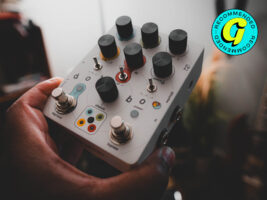
There’s a refreshing approach to colour in the design of the Dobbo – it’s bright primary-hued and in a strange way almost childlike. This clean and carefully thought-out approach feels very sensible considering just how integral color is to understanding how this pedal works (more on that later).
The minimalist graphic style is also welcome when you contrast the large number of controls on offer – seven knobs, five switches, and single soft switch. On paper, that sounds like a lot, but navigating it is an intuitive doddle thanks to the clever way that Dobbo has used colour instead of text to label the thing.
Each parameter has a corresponding color, making it surprisingly easy to understand what’s happening at a glance. For those of us who would rather dive headfirst into creating weird sounds than spend an evening curled up with an instruction manual, that’s a welcome surprise.
Elsewhere, Dobbo has the modern conveniences you’d expect from a pedal this ambitious. There’s USB-C for firmware updates, alongside high impedance stereo input and outputs, plus an expression/MIDI jack for all the cool nerds out there.
Image: Jason Mays
Couple that with eight onboard presets and tap tempo, and there’s quite a bit packed into Dobbo’s colorful enclosure. And if you’re already mentally rearranging your pedalboard, don’t worry: it’s roughly the same size as a Little Big Muff Pi.
Rather than turn this into a lengthy explainer of every knob and switch, let’s focus on the three controls that, in my opinion, are the most important to understanding Dobbo: Pitch, Chance and Space.
Pitch controls the pitch of your grains across four octaves, from two octaves below your original signal to two octaves above it. Just bear in mind that how it behaves is also determined by the corresponding Pitch mode toggle.
Chance is where things get really interesting. It controls the amount of randomization applied to four of Dobbo’s main parameters, with each one color-coded to its corresponding control with five LEDs laid out like the side of a die. It’s a clever visual language that makes something potentially complicated much easier to understand.
Finally, Space controls the spatial characteristics of your grains. In layman’s terms, it essentially adds reverb to each individual grain, giving those tiny pieces of your signal a greater sense of depth and, well… space. It’s a relatively simple idea on paper, but it becomes pretty important once you start using Dobbo in real time.
Image: Jason Mays
Sounds
Since I’m a self proclaimed experimental soundscape enthusiast who likes to get weird, I figured there were few tools better suited for the job than an offset guitar running into an amp capable of beautiful cleans and a little edge of breakup grit. Because realistically, what guitar is more strongly associated with experimental textures and soundscapes than the Jazzmaster?
Paired up with my beloved Marshall combo, I started messing around with a few of the presets included in the manual, beginning with Rich Chorus, arguably the safest place for newcomers to start. It takes advantage of the Pitch portion of Chance and essentially transforms Dobbo into a granular chorus. You still get the bleeps, bloops, and slightly unpredictable character you’d expect from a granular effect, but they’re joined by a warble that feels more like a traditional chorus and considerably less alien.
Strumming a few chords through it sounds a bit like Adam Granduciel’s chorus tones from The War on Drugs being filtered through the electronic weirdness of Radiohead’s Kid A. And yes, that combination is every bit as fun as it sounds.
Rate and Time also do a ton of heavy lifting here. Adjusting the two alongside Pitch, Space, and Chance quickly had me channeling my inner Pachuca Sunrise-era Minus the Bear, turning otherwise straightforward guitar leads into quick chops, stops, and almost synth like bursts of buttery stutter. Surprisingly, it all feels considerably more musically usable than I initially expected from something this unpredictable.
All of that sounds pretty cool, but I also don’t want to oversell Dobbo’s ease of use because, ironically, its accessibility is both one of its greatest strengths and one of its biggest shortcomings.
There’s a caveat however: it’s easy to use provided you already have some experience with granular effects. For players whose creative coloring tends to be a little more traditional, all of those grains, chops, pitch shifts, and randomization can become overwhelming pretty quickly, especially once Chance enters the equation.
The visual layout certainly makes the learning curve considerably less intimidating, but it doesn’t eliminate it altogether. This is still granular synthesis we’re talking about. If your idea of adventurous delay begins and ends with your grandpa’s DD-3, Dobbo is going to require a little more patience before the weirdness starts making sense.
Should I buy one?
With the granular effects category continuing to grow and more companies throwing their hats into the ring, you might be asking yourself: is Dobbo actually worth buying?
The answer is absolutely.
Dobbo is fun and creatively inspiring in a way that really has to be played to be fully appreciated. For anyone looking for a pedal capable of building glitchy ambient textures, unpredictable soundscapes, and wonderfully weird sounds, there’s a lot here that makes Dobbo worth exploring over some of the other options in an increasingly crowded category.
And the biggest selling point is undoubtedly Chance.
It’s the feature that gives Dobbo its personality and turns something as simple as a guitar part into something unexpected. Of course, that unpredictability also means Dobbo isn’t necessarily a pedal built around immediacy. If you want to plug in, turn a couple of knobs, and know exactly what’s going to happen, at a relatively affordable price point, this might not be the pedal for you.
But if you’re willing to embrace a little unpredictability and, quite literally, take a chance on Chance, there’s a wonderfully creative reward waiting for you on your next ambient endeavor.
Alternatives
With granular effects becoming all the rage nowadays, there are a few alternatives I’d recommend if you’re not quite ready to take a Chance on Dobbo.
First, for anyone just getting their feet wet in the world of granular effects, there’s the Walrus Audio Fable. At around three quarters of the price of Dobbo, it’s one of the most rewarding options out there for soundscape enthusiasts, offering plenty of experimental weirdness without feeling completely overwhelming.
For more of an all in one experience, there’s the brand new AC Noises Continua. It offers its own unique take on grains, bleeps, bloops, and unpredictable textures, while giving you plenty of room to venture into more traditional ambient territory as well.
Lastly, for anyone on a budget who isn’t quite ready to venture into the pricier side of granular effects, there’s the JHS 3 Series Glitch Delay. It’s considerably simpler than something like Dobbo, but that’s also part of its appeal. For ambient newbies looking to dip their toes into glitchy, chopped up textures without breaking the bank.
The post Butterfly Effects Dobbo review: “there’s a wonderfully creative reward waiting for you” appeared first on Guitar.com | All Things Guitar.
Source: www.guitar-bass.net