
Positive Grid Reactor review: does your guitar amp really need an AI chatbot?
$349, positivegrid.com
Hands up if you’re sick of hearing about AI? It is the two letters everyone seems to be getting increasingly fed up of here in 2026, as promises of generative AI solving all the world’s problems a year or so back seem to have ended up with a reality where the technology’s primary application seems to be driving your friends to psychosis, rendering your job obsolete or, at best, ensuring that your next phone or laptop is going to cost dramatically more than it should do.
READ MORE: Blackstar ID:X 50 review: “stands out by knowing exactly what it is, and who it’s for”
Obviously, not everyone feels that way, but if there’s one group of people who seem to be inclined to be even more sceptical about the benefits of large language models than the general population, it’s musicians.
Wholly AI-created music and art is straight up bad, and morally suspect along with it – you won’t find too many real musicians dying on that particular hill – but is it always a bad thing, necessarily? Are we still capable of detaching the useful and non-sketchy uses of machine learning from the attention-grabbing stuff that everyone seems to hate?
All of which is a long-winded way of observing that it’s a pretty interesting time for smart amp king Positive Grid to be launching its first real foray into creating a proper for-purpose gigging guitar amp… and one that has AI quite literally written on the control panel.
The Reactor is that amp, but PG is at pains to point out that the ‘AI’ in this case actually stands for “Amp Intelligence” – and it promises a wholly new way for guitar players to go about crafting their guitar tones…
Image: Adam Gasson
Positive Grid Reactor 50 – what is it?
It’s important to point out right at the top that the Reactor is deliberately and intentionally NOT a Spark product. Positive Grid’s revolutionary smart amp family has spent half a decade building up goodwill amongst the guitar community – and with good cause given how impressive the Spark is and remains as a platform.
The Spark has, on several occasions now, attempted to break away from the confines of bedroom practice – the Spark Cab made any Spark amp gig-ready, while the Spark Edge and Spark Live portable PA systems were designed to cater to whole bands.
The Spark could never fully escape its roots as a pure home practice solution, however, and so it makes sense that Positive Grid has now created a bespoke new platform that combines some of the best bits of both Spark and its BIAS X amp software, and put it into an affordable proper guitar amp.
But, Positive Grid being Positive Grid, they were never going to put out yet another affordable modelling combo into the great Katana-killer bun fight. To their credit, the brand always tries to come to the party with something new and innovative, and in this case it’s the aforementioned Amp Intelligence.
Amp Intelligence is, says PG, “a new type of sound engine that builds guitar tone on demand”. They’re keen to call it an “intelligent tone engine”, but in real terms that’s an AI chatbot that has been trained on over 200 different amplifiers at a component level – gain stages, transformers, bias points, harmonic response; the lot – and can use that in-depth knowledge of how amps work to build a tone for you on demand.
So the theory goes, that knowledge enables you to have a chat with your amp – via the accompanying Reactor smartphone app – describing the tone you want via text, an image or a sound clip. The AI will then analyse what you’ve given it, and spit out some suggested tones that you can then tweak either on the app or using the controls on the amp itself, and save forever. Like most chatbots, Amp Intelligence can apparently learn your preferences sound-wise over time, and so the more you use it, the better it’ll get at creating sounds you like.
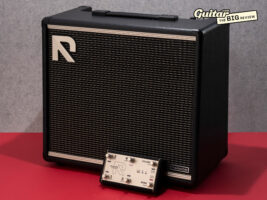
Away from the high-tech stuff, the amp itself is impressively kitted out for one in this price point. The base 50-watt version features a 12-inch custom-designed speaker, with switchable power scaling down to 25w and 1w. Round the back you’ll also find a cab-simulated line out, USB-C for direct recording, MIDI, headphone out, power amp input and effects loop. The amp features built-in Bluetooth; both for communicating with the app, and also for streaming music directly to the unit.
Under the hood and away from the AI, you’ll find 24 different onboard amps to choose from, as well as 28 different effects types. The control panel is fully featured in a way that no other PG amp has been before – you can select from six different amp types using a classic Line 6 Spider-style rotary (from Clean to Extreme) or override them by choosing one of eight onboard signal chain presets.
You get full control of your tone stack, plus the ability to tweak the level of whatever effect is in one of the six different effects blocks. If you want hands-free control, the Reactor pairs with optional Reactor Control Bluetooth controller ($149), which offers you full wireless control of your presets, or the ability to run it in stompbox mode – if you run out of battery the switch can be plugged in, so you don’t have to worry about a lack of juice ending your gig.
Positive Grid Reactor Control Bluetooth controller. Image: Adam Gasson
Positive Grid Reactor 50 – build quality and user interface
Upon removing the Reactor from its box, I’m reminded that not every modelling amp can be as back-friendly as the trusty Tone Master Princeton that sits in its usual testing spot – though at 10.4kg, it’s still a good kilo lighter than the Katana 50, though a little heavier than the Blackstar ID:X.
Like all of Positive Grid’s amps, the weight is reflected in a reassuring overall build quality. The wood cabinet feels solid and well put-together, the simple black tolex and black and gold grille cloth are understated and professional, and the control panel is clearly laid out with premium-feeling knobs, switches and buttons.
As I’ve come to expect from Positive Grid, the app connection experience is pretty seamless. I downloaded a test version of the new Reactor app to my iPhone 16 and within a few seconds it had connected the amp and was displaying the signal chain for the preset the amp was currently set to. You can adjust everything in real time both on the app or on the device, and changes are reflected instantly.
We’re 30 years into amp modelling at this point, and so you’d think there wouldn’t really be much to say about the user interface and signal chain given that it’s all rather standardised at this point. Except, for some reason, rather than represent each amp and effect using easily recognisable graphical depictions of said amp – a Tube Screamer, a Marshall amp etc – they’ve opted to use incredibly ugly AI art instead.
Positive Grid Reactor app effects. Image: Guitar.com
For a variety of reasons, this sucks. For one, it sucks that the creative humans at Positive Grid don’t deem the labour of a fellow creative human artist something that’s worth paying for. For another, as a product that’s aimed at newer players, the fact that none of the amps and effects are easily recognisable as themselves makes the whole thing harder to navigate on the fly. Thirdly, they look – and I must allow myself to speak plainly here – total shit. Amps with knobs where knobs would never be, pedals with classic GenAI gibberish written all over them… who wants this?
Anyway, that aside, it’s all pretty straightforward – in fact, if you’ve ever used a Spark amp, the signal chain stuff is basically identical; it’s all very simple.
The app lacks the SmartJam and similar home practice-focused tools of the Spark app, because this is obviously a gig-focused bit of hardware, but you do still get access to the ToneCloud platform, which allows you to search and download user-generated presets. Obviously, I’m reviewing a pre-release demo version, so it’s pretty quiet in there at the moment, but if the Spark version is anything to go by, this could soon become a hugely deep library of sounds.
The last part of the app is the ‘Creator Hub’ and this is the bit where we can delay no further, we must prostrate ourselves at the feet of the Amp Intelligence.
Positive Grid Reactor app Creator Hub. Image: Guitar.com
Positive Grid Reactor 50 – does Amp Intelligence actually work?
Tapping on the Creator Hub takes you to a user interface with four options, displayed with – don’t think you’re getting away that easy – more ugly GenAI art. The options presented let you either describe your tone using text, take a photo of something you want it to create a tone out of, and the ability to upload or record a song for it to analyse.
The text one is probably the one that most of us will go to first, and so it’s where I start first, and instantly I find the hype bumping into the reality of the hardware. Perhaps it’s my fault, but when reading the blurb accompanying Amp Intelligence, I was struck by the claim that “any tone imaginable can be delivered on demand, from the familiar to never-before-heard”. That sounds pretty exciting, doesn’t it? Especially when you combine that with the claim that it has “decoded over 200 amp designs at the circuit level”.
With that in mind, I don’t think it was wholly unreasonable to expect that Amp Intelligence would be able to use that circuit-level knowledge to, y’know… create a new amp sound? One that combined, say, the glassy cleans of a Fender with the full-throated roar of a Marshall? But alas no, despite various attempts to get it to mash up amp circuits in an unholy Frankenstein’s monster of tone, it always just gave me one of those 24 amp models with some EQ or other tools to make it sound like I asked for. The future, eh?
The experience of using the chatbot input will be familiar to anyone who’s tried to get any other kind of AI chatbot to do something mildly tricky. Sometimes it works like a charm and gives you what you want straight away, other times it’s massively wide of the mark.
It has a bad habit (just like BIAS X) of responding to my requests to tweak a tone by adding more stuff to the chain – if I asked it to tweak the tone stack, for example, rather than adjusting the settings on the amp, it seemed to want to always chuck an EQ pedal into the mix.
It also seems to do that thing that anyone who’s used an AI image generator will be familiar with – the more you ask it to tweak a thing, the messier the whole thing gets. In practice, it’s easier just to tweak things yourself once Amp Intelligence has got you most of the way there.
It also occasionally just completely ignores what you’re telling it, then telling me that it had, in fact, done what I asked – HAL style. After the second or third go-around in this situation, it led to me having what effectively amounted to an argument with a guitar amplifier – a situation that edified nobody involved, least of all me.
If you keep things simple and clear, however, it has a pretty good hit-rate for providing usable sounds. It also broadly knows what you’re talking about when it comes to artists, albums and the like. You can raise your own eyebrows about exactly what kind of training data the AI has been gobbling up to be able to do that, but from a user perspective – especially for a beginner-focused product – it’s a really handy tool.
Playing a song into it seems to generate more precise results than talking to the damn thing, and I imagine this would be my preferred means of input were it my daily driver. Clearly having a precise sense of what sound you’re trying to get helps it to deliver a more accurate tone out the other end.
The picture-taking option feels like a bit of a gimmick – it is quite fun to see what it thinks would be an appropriate tone for the various tchotchkes I have scattered around my desk, or indeed the handsome cat that wandered into our kitchen (“a tone that captures his playful, agile character” if you’re interested).
It is actually pretty good if you give it something less random to work with – for instance, if you take a photo of a real amp, it’ll do its best to emulate it. Equally, I was impressed with the tones it would suggest based on a picture of a guitar: I snapped a shot of the Klang DC aluminium-necked guitar Cillian recently reviewed and it suggested a bunch of heavy, doomy tones that would be a perfect companion for it.
The final option is the Fix My Tone – basically, you ask the amp to analyse your current sound, tell it what you don’t like about it, and it suggests helpful ways you could change it. While again, the results were not always flawless, the way that it explains what it’s changing and why I think is super useful if you’re a relative newcomer trying to understand how and why a signal chain sounds the way it does. It helps you understand real-world gear in a way that something like this could obscure – and that’s really useful.
What it isn’t, however, is quick. The blurb claims that the AI will spit out a tone for you in ‘seconds’ and while that’s technically true… it is quite a lot of seconds. Especially for the image prompts, I was waiting a good minute or two for it to come back with something.
That said, I’m using a TestFlight version of an app that is still in development at the time of writing, so I’d hope that when things are fully up and running, they might be able to speed things up.
Image: Adam Gasson
Positive Grid Reactor 50 – sounds
All the talk about apps and Amp Intelligences and what a cat would sound like if he was a signal chain does rather obscure the fairly basic questions that we should be asking about any amp – does it actually sound any good? Well, yes actually – very.
Firstly, let me get this out of the way – for a 50-watt digital combo, this thing is loud – organ-botheringly loud – especially at close range and with the amp running at full power. This is a box that could easily make itself heard in a small band, and it does so with plenty of clarity even with the master volume maxed out. It’s still punchy enough for a lot of people on 25-watt mode, while the one-watt is home practice suitable without being totally weedy – in fact it retains the punch, warmth and character of the amp even at late-night practice volumes.
If you can get past the godawful visual representations of the amps in question, the sounds here are very impressive indeed. They feel like a definite step up from the (very good) sounds found in the Spark amps, and are much closer to the studio-ready tones found in BIAS X – that 12-inch speaker does a nice job of putting them into the world, too.
Another handy bit of tone sculpting comes in the shape of two toggle switches – Heat and Smooth/Push. The former is designed to give you six different degrees of playing feel and harmonics without altering the volume of the amp. In practice this is more noticeable with high-gain tones, and it’s subtle, but a nice one to have.
Smooth/Push is basically a mid control from what I can tell – in push mode it’s sharper and easier to cut through in a mix, smooth is rounder and better suited to rhythm playing. If you’ve used the similarly named control on a Boss Katana you’ll know the deal – it’s a really useful bit of tone-shaping to have at the flick of a switch though.
Image: Adam Gasson
The effects are broadly very good without being totally spectacular – the dirt pedals have always been a strength of PG’s offering and they are the standout performers here. But you’ll find most of the usual suspects represented in some fashion here, though you’re limited to just one dirt, one modulation, one delay etc.
You might find yourself wondering why on earth there’s only one reverb – click on the relevant effects block and it appears that the only option is “studio reverb”. Thankfully, this is just some uncharacteristically bad UX – there are eight different reverb modes hidden on the ‘mode’ switch of the pedal itself that cover the bases of room, hall, plate and chamber. It’s weird to not have a spring reverb in there, though.
You can, however, move the blocks in the signal chain around at your leisure – something that’s not always the case with entry-level amps – and that’s especially useful if you want to use the effects loop. You can plug your board in and stick it anywhere you like in the chain, really opening up the sonic possibilities.
In terms of how well it takes pedals, well… it’s not going to replace the aforementioned Tone Master as my digital pedal platform of choice, but it acquits itself well, even when faced with the glitchiest fuzzes and the most cavernous reverbs.
Image: Adam Gasson
Positive Grid Reactor 50 – should I buy one?
There’s a part of me that wishes that the Reactor didn’t build the polarising and variably successful Amp Intelligence stuff so heavily into the marketing razzmatazz, because you sense that it is invariably going to be labelled the “AI amp” and prejudged on that basis.
Because in truth, you could never even glance at the Amp Intelligence section of the companion app, and this would be one of the very best affordable modelling amps on the market.
The sounds are genuinely some of the best in class, the usability and functionality is better than many of the big-hitters in this sector, and it is bloody loud along with it. You could, in the finest traditions of the Spark, spend an afternoon getting your presets set up in the app to your liking, close it down and gig for the rest of your natural life without ever once having to open it again – everything you need to tweak is right there on the amp itself.
But we live in 2026 here, and so the Amp Intelligence thing is very much a key plank of this whole endeavour – no matter how unnecessary it might be for a lot of players. That means that I have no choice but to factor it into my opinions about the product as a whole.
And look… it’s… okay? It’s better than the AI features in Spark, and probably a bit worse than the ones in BIAS X. Most of the time it does a pretty good job of crafting tones for you, and sometimes it makes you pray for the asteroid to hit the earth. Anyone who has had to use an AI chatbot for any kind of serious purpose will understand this feeling.
There is, of course, the ethical elephant in the room. Positive Grid has never provided a satisfactory answer regarding what they’re using to train their AI models with, and there is of course the environmental impact of running LLMs like this. And that’s before we get into what we were talking about up top in this review – that a large swathe of musicians are reflexively hostile to anything that attempts to inject AI into music creation.
It would be a real shame if people wrote the Reactor off on the basis of two letters printed on the control panel, because this is an impressive and serious new contender in the affordable gigging amp world.
Positive Grid Reactor 50 – alternatives
There is perhaps no sector of the guitar amp world more competitive than the one in which the Reactor is wading into. The king of the sector currently is the identically priced Boss Katana-50 Gen 3 ($349 / £269) – it’s simple to use and has a wealth of good onboard sounds. Blackstar’s ID:X 50 ($349 / £289) is an impressive recent attempt to take on the Katana, but if you want something that’s a bit more straightforward and – I cannot stress this enough – comically loud, the all-analogue Orange O-Tone 40 ($399 / £329) is a gig-ready monster. If you like Reactor’s smart amp elements but don’t need the gigging power, the Positive Grid Spark 2 ($349 / £279) is a fantastic home practice tool with less sounds overall, but a much more fleshed-out home-playing experience.
The post Positive Grid Reactor review: does your guitar amp really need an AI chatbot? appeared first on Guitar.com | All Things Guitar.
Source: www.guitar-bass.net