Fender Studio Pro 8 and Quantum LT 16 interface review: a guitar-recording match made in heaven?
$499/£429 (interface with software), $199/£169 (software), fender.com
Now, before you check what’s in your URL bar, yes, this is still Guitar.com. While recording software and audio interfaces are not often something we’ll give full reviews, Fender’s new Studio Pro 8 DAW and Quantum LT interfaces cross-pollinate some explicitly guitar-friendly features into what were previously pretty general-purpose things.
READ MORE: Kemper Profiler Mk II review: “the most accurate amp profiling I’ve ever experienced”
The two releases follow Fender’s acquisition of PreSonus a few years ago, and are seemingly an attempt to fold in some of the guitar audience into the more music tech side of things. So will this new DAW/interface combo be a powerful pairing for a guitarist’s home studio?
Fender Quantum LT 16 interface. Image: Press
Quantum LT 16
Hardware first. The LT 16 is contained within a slim 1U rack panel, with the LT 2 and the LT 4 being smaller standalone desktop variations of the interface. Above the LT range there’s also the much more pro-level (and pro-priced!) Quantum HD interfaces, which boast more extensive I/O, ADAT expandability and higher-end preamps, but for now I’m taking a look at the highest-end of the entry-level series of interfaces.
While the LT 16 is technically a 16-input interface, only eight of these boast mic preamps. The other eight are analogue ¼” line inputs on the back panel. There’s no ADAT expandability here, and so if you want to connect 16 mics in total, you’ll need a bank of eight analogue preamps to go into those line inputs. For most home recording needs, though, this is unlikely to be a roadblock you’ll run into quickly. However, if you want to build a portable full-band recording rig, it does limit your choice of preamp bank to complement it.
The hardware controls and the rest of the I/O are pretty simple – you’ve got eight volume knobs for the preamp-loaded inputs, a master volume for the main monitor outs, and a separate volume control for the ¼” jack, along with phantom power and master switches. There aren’t many bells and whistles here, which I think makes a lot of sense. Looking at it from the perspective of a guitarist who wants to spend more than the absolute bare minimum on an interface but not splash out on high-end pro-grade kit, it’s a good balance of power and usability.
And speaking of guitarists – two of the front panel’s inputs are designated as combination XLR/instrument inputs, whereas the other six are combination XLR/line inputs – it can be a confusing distinction, but the main thing to note here is that the if you’re going straight in, you’ll want to take things like synthesisers and loud preamp pedals into the line-level ¼” inputs, whereas the instrument inputs will provide higher impedance – meaning better performance when you connect a guitar’s pickup straight to them. And, for the purposes of trying out Fender Studio Pro’s new suite of virtual amplifiers, that’s just what I do.
It’s good to know what you’re working with sonically if you are planning to add software amps and effects – and the good news is, that the direct tone is actually quite pleasing by itself. It’s never going to be a mind-blowing sound – it’s dry as week-old crisps by nature. But the sound is bright and clear, and it remains particularly responsive as I roll the volume down. Some interfaces, despite using high-impedance inputs, still manage to introduce a little mud into the equation – here, it’s bright and punchy all the way.
This bodes well for playing around with virtual amps – if only there was a new DAW absolutely chock full of them bundled in with this interface. Oh, there is? Well, let’s look at that then.
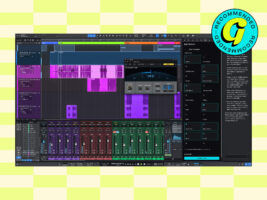
Fender Studio Pro 8. Image: Press
Studio Pro 8
Firstly, what is Fender Studio Pro 8? Well, it’s the follow-up to PreSonus’ Studio One Pro 7, which, thanks to the slightly confusing naming convention of it all, isn’t immediately clear. Given that it removed the now-acquired brand name but didn’t start the enumeration over again, and there were previously two separate numbers in the product’s name, I think we were probably destined for at least some confusion here.
While some PreSonus fans were totally up in arms about the Fender rebrand, some of the furore seems a little overblown. Granted, the Fender branding is now going through its own publicity crisis as I write this, but regardless Fender Studio Pro 8 adds a whole lot of features and has come with what I personally think is a pretty neat design overhaul, with a measured approach to skeuomorphism and – bias at play here – some things that make the previously idiosyncratic aspects of PreSonus’ design language a little clearer to guitarists.
But… that’s not to say I’m totally on board with how Studio Pro 8 has been launched. Upon its announcement, I actually went “Oh, that’s what they were doing”, out loud. Because, up until then, I had been somewhat confused by the existence of Fender Studio, a completely free and slightly limited DAW that had no paid counterpart. At the time it struck this weird middle-ground, a Garageband without a Logic, a little too basic for some use-cases, a little too unwieldy for others.
However, now the existence of Fender Studio Pro 8 means the existence of the free Fender Studio makes much more sense – particularly from the guitar perspective. Alongside a lot of the features that make it a “full” DAW, the upgrade to the paid version also gets you a much bigger suite of virtual Fender amplifiers, and so there’s a bit of a clearer progression from the limited Studio to the heftier Studio Pro 8. Far be it for me to tell Fender how to do things, but if the free version of Fender Studio had arrived simultaneously alongside this fully-fledged DAW, I think I would have been a little nicer to it in my review.
Image: Press
In use
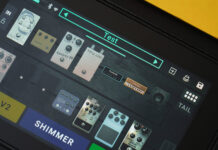
Anyway, I’m not here to deliberate exactly how Fender should have launched a DAW – instead, it’s time to dive into the thing it has launched, from a guitarist’s perspective. First off – that suite of amps and effects. These are housed in two separate built-in plugins (Mustang Native for guitar, Rumble Native for bass), and if you’ve used any of Fender’s recent multi-effects units or accompanying apps, both will look pretty familiar, as they use an almost identical UI to things like the Tone Master Pro or the tone editing app for the Mustang Micro. You’ve got the standard signal chain line, onto which you can load amps, effects and cabs – the selection of which is pretty huge, much more so than you’d get bundled in with most in-built DAW guitar plugins.
Unlike the free version of Fender Studio, there’s also a pretty wide variance in the types of tones on offer, and amp models include some pseudo Marshalls, Oranges, Hiwatts, Mesa Boogies, and so on alongside the branded Fender stuff you’d expect. Effects are also extensive, with everything included from Klon-clones to Fender’s own effects to Space Echo emulations.
It is not the prettiest thing in the entire world, but boy, is it usable, and the sounds are absolutely there. Are they as dead-on as the highest-of-high-end captures you might get with something like a Quad Cortex or an Archetype plugin? Perhaps not, but they’re definitely in that final percentile of quality that means to truly pit them against each other would be a pretty hair-splitting endeavour. They’re more than good enough for most recording situations, and, coupled with the nice low latency and quality input from the LT interface, they feel pretty great to play, which is more than you can say for some other in-built amp sims.
This quite nicely parallels the newly-designed channel strip interface, which has been designed explicitly to take guitarists into account – as it’s a left-to-right signal chain (OK, yes, pedalboards go the other way, but in virtual software land some traditions won’t be bucked) that displays your plugins as modular blocks. Not totally unique as a thing, but nicely implemented, particularly in the simpler versions of the plugins that display in the wider view, that can then be viewed in more detail by expanding them.
This brings me to a wider point about the interface design, which is, I think, fairly slick and modern, and parsable for my particular self-taught approach to DAWs. In short, most guitarists who want to dabble in this world will likely not be put off by any overly visual complex parts of its design as they might with, say, Pro Tools. Oh, and you can also change the keyboard shortcuts fairly easily – pretty essential when you’re a 60% keyboard user like me, and the default record button is for some reason on the numpad.
Headline new features include some nifty stem separation (one of the few uses of AI in music everyone seems to agree is a pretty neat trick), and the related audio-to-MIDI feature, which lets you pull MIDI data from any recorded audio, and hence play it on software instruments etc. Great for playing a chord progression on your guitar once, and then using that as the base MIDI data for some synth accompaniment – no more dragging out chords in the piano roll, or trying to remember where you left that MPK Mini.
And there’s a lot more besides, of course – here we stand on the crumbling precipice above the ocean-deep feature set offered by this DAW – there’s a lot more to say about what this can do, given that it is, after all, a full release of Studio One. But, to go back to your URL bar for a second, this is still Guitar.com – if you are a guitarist’s guitarist, and have seldom opened a DAW, you could do far worse than the pretty guitarist-friendly design of this one.
The post Fender Studio Pro 8 and Quantum LT 16 interface review: a guitar-recording match made in heaven? appeared first on Guitar.com | All Things Guitar.
Source: www.guitar-bass.net